Product Update Email Template: 6 Examples to Copy
Six product update email templates to copy or download: feature launch, monthly update, fixes, price change, breaking change and upgrade, with examples.
The short answer
A product update email needs a subject line that names the change, preview text that says why it matters, the one headline change first, a single step to take, and one line for everything else with a link to the changelog. Pick the template by what you need the reader to do: try a feature, skim a monthly update, notice a fix, understand a price change, act before a breaking change, or consider an upgrade.
Key takeaways
- Name the change in the subject line; "October product update" gives no reason to open.
- Write the preview text yourself, or the inbox shows "View in browser".
- One headline change and one main button per email; everything else is a line.
- Price and breaking change emails say what changes, when, who it affects and every option, in the first lines.
Most product update emails fail in the inbox, before anyone opens them. The subject line says "October product update" or "What's new at Acme", the preview text is the first line of a logo's alt text, and the reader has no reason to open it this week rather than never.
This post gives you six product update email templates you can copy or download: a new feature announcement, a monthly update, an improvements and fixes email, a price change notice, a breaking change notice and a product upgrade email. Each one has a filled-in example for Acme, a made-up help desk, with the subject line and preview text written out. Then it covers subject lines, plain text or HTML, how often to send and a checklist to run before you hit send.
Which product update email template to use
Pick the template by what you need the reader to do. A feature email asks them to try something; a price or breaking change email asks them to act by a date; a monthly update asks for nothing and has to earn its open with the best thing in it.
| Template | Use it for | What the reader should do | Length |
|---|---|---|---|
| New feature announcement | One feature worth its own email | Try it | 60–150 words |
| Monthly product update | Everything that shipped in a month | Read the highlights, click one | 200–400 words |
| Improvements and fixes | Small changes that add up, or a fix many people hit | Notice the product got better | 80–200 words |
| Price change | A new price, plan or billing rule | Know what changes, when, and their options | 120–250 words |
| Breaking change or deprecation | Something existing users must change | Take one step before a date | 100–200 words |
| Product upgrade | A feature on a higher plan, sent to people who'd use it | Upgrade, or ignore it | 60–150 words |
If you only send one kind of product update email, make it the monthly update, and send a separate feature email only when one change is big enough to stand on its own.
Download the templates
Every template is a plain text file. The Markdown versions paste into Gmail, Mailchimp, Substack, Beehiiv and most email editors as formatted text once you convert it (see below); the .txt file is the same six templates without any formatting.
| Template | File |
|---|---|
| All six in one file | product-update-email-templates.md |
| All six, plain text | product-update-email-templates.txt |
| 1. New feature announcement | new-feature.md |
| 2. Monthly product update | monthly-update.md |
| 3. Improvements and fixes | improvements-fixes.md |
| 4. Price change | price-change.md |
| 5. Breaking change or deprecation | breaking-change.md |
| 6. Product upgrade | product-upgrade.md |
Gmail and Outlook: both compose in rich text, so paste the plain text version and bold the headings yourself, or write the email in Google Docs (right-click, "Paste from Markdown") and copy it across. Mailchimp, Beehiiv, Substack: paste the text into a text block and apply the heading style to the lines that start with #, then delete the # signs.
What every product update email needs
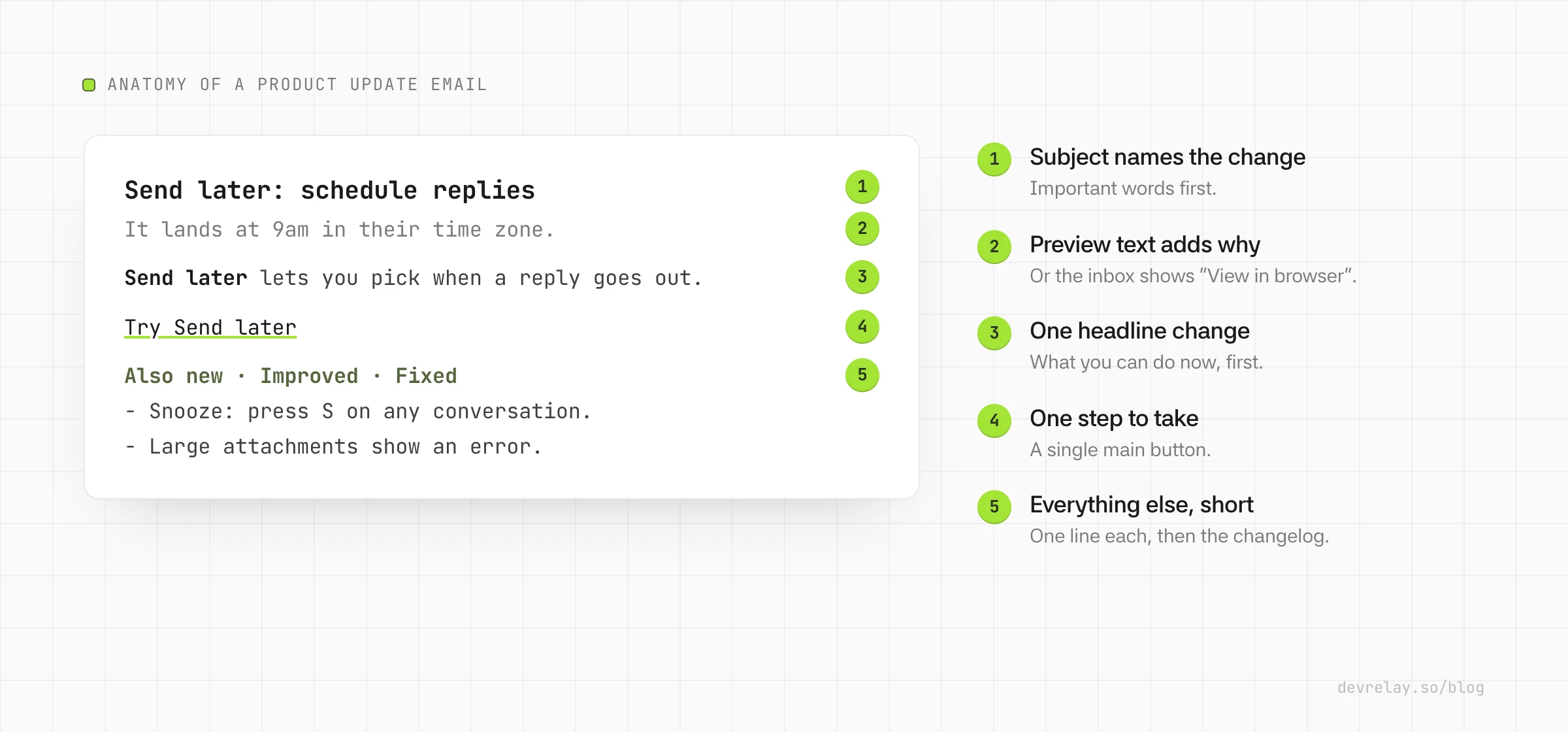
A product update email has five parts, and the first two do most of the work because they're all the reader sees in the inbox:
- A subject line that names the change. "Schedule replies to send later" beats "Acme product update, October". If the email covers a month, name the best thing in it: "Send later, faster search and 3 fixes".
- Preview text that adds the reason to care. The inbox shows it after the subject. If you don't set it, most email clients show the first text in the email, which is often "View in browser" or an image's alt text. Write it as the second half of the subject: "Customers in other time zones hear back during their day."
- One headline change, first. Even in a monthly update, lead with the single change most readers will care about, with a sentence on what they can do now.
- The one step to take. One button or link per email that matters: try the feature, read the migration guide, review your plan. A second call to action is fine for "read the full changelog"; five are not.
- Everything else, short. One line per smaller change, then a link to your changelog or release notes for the full list.
What to leave out: version numbers (customers of a hosted product don't know what 4.12 means), internal project names, the names of the engineers' tools, and anything users can't see or use.
1. New feature announcement email template
Use this when one feature is big enough that you'd be disappointed if a customer missed it. Keep it to that one feature: a second one in the same email halves the attention each gets.
Subject: [Feature name]: [what you can now do]
Preview: [Who it's for, or the problem it removes]

Hi [first name],

[The problem, in one sentence, in your customer's words.]

**[Feature name]** [what it does, in one sentence]. [Where to find it
and the first step.]

[One screenshot or a short GIF of the feature in use]

[Button: Try [feature name]]

[One line on a detail people will ask about: which plans have it,
a limit, whether it's on by default.]

[Your name], [role] at [Product]
Filled in for Acme:
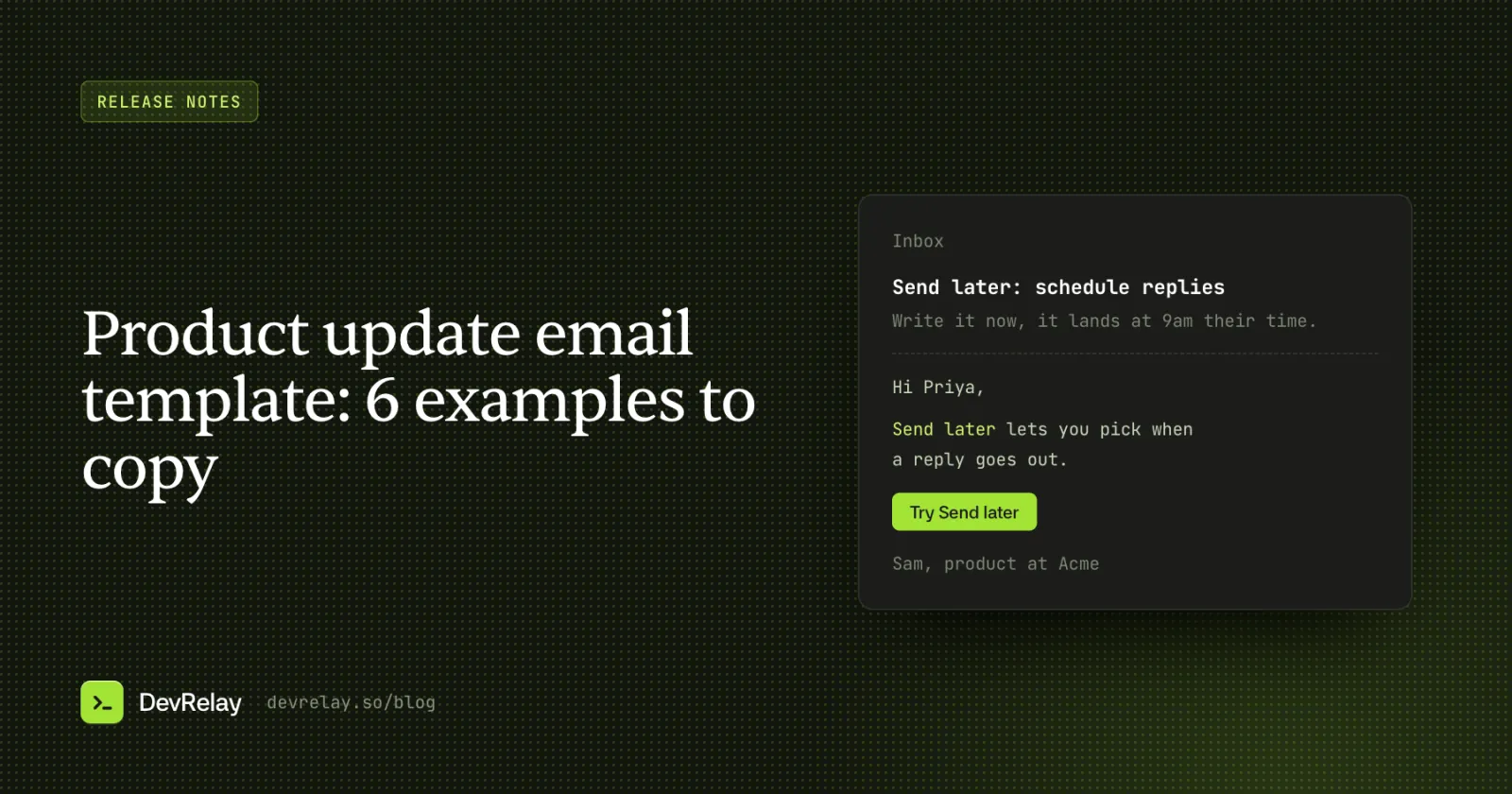
Subject: Send later: schedule replies for your customer's morning
Preview: Write the reply now, it lands at 9am in their time zone.

Hi Priya,

Replying at 11pm shouldn't mean your customer gets an email at 11pm.

**Send later** lets you pick when a reply goes out. Click the arrow
next to Send, choose "Tomorrow 9am (their time)" or any time you like,
and Acme sends it then. Scheduled replies wait in the new Scheduled view.

[GIF: choosing Send later on a reply]

[Try Send later]

Send later is on for every plan. You can edit or cancel a scheduled
reply until it goes out.

Sam, product at Acme
Signing it from a person, with their role, reads as news from the team rather than a campaign, and replies come back to someone who can answer them.
2. Monthly product update email template
The monthly update is the email most teams send and most readers skim. It works when it opens with the best change, not a greeting, and when every line after that is something a customer could notice.
Subject: [Best change], [second change] and [N] more updates
Preview: What's new in [Product] this [month]

Hi [first name],

Here's what changed in [Product] in [month].

## [Headline feature]
[Two sentences: what you can do now, and why it matters.]
[Link: How it works]

## Also new
- **[Feature]**: [one sentence]. [Link]
- **[Feature]**: [one sentence]. [Link]

## Improved
- [Thing that works better, in terms users notice].

## Fixed
- [The symptom users saw] no longer happens.

## One tip
[A feature people already have but don't use, in two sentences.]

Every change is in the [changelog]. Reply to this email if something
isn't working the way you expected; it comes to the team.

[Your name], [role] at [Product]
Filled in for Acme:
Subject: Send later, faster search and 3 fixes
Preview: What's new in Acme this September

Hi Priya,

Here's what changed in Acme in September.

## Schedule replies to send later
Write a reply whenever you have a minute and pick when it goes out.
It lands at 9am in your customer's time zone.
How Send later works →

## Also new
- **Snooze**: press S on any conversation and it comes back when the
  customer replies.

## Improved
- Search finds tickets by customer email domain, not just full address.

## Fixed
- Attachments over 10 MB show an error with the size limit instead of
  failing silently.
- The unread count no longer stays at 1 after you read everything.
- Saved replies keep their formatting when you insert them.

## One tip
Type "/" in any reply to search your saved replies without leaving
the keyboard.

Every change is in the changelog. Reply to this email if something
isn't working the way you expected; it comes to the team.

Sam, product at Acme
Notice the subject line: it names two real changes and a count, so a reader can decide from the inbox whether this month matters to them. "Acme September update" asks them to open the email to find out.
3. Improvements and fixes email template
Fixes rarely deserve their own email. Two cases do: a fix for a problem many customers reported (they want to hear it's gone), and a month where the improvements add up to "it's faster and calmer to use" even without a headline feature.
Subject: [The problem] is fixed
Preview: [What you can do again, or what's faster]

Hi [first name],

[One sentence acknowledging the problem, as customers saw it.]

It's fixed: [what happens now]. [If they need to do anything, the step.
If not, say so.]

A few other things got better this [week/month]:
- [Improvement, in terms users notice].
- [Improvement].

Thanks to everyone who reported it. [Optional: what you changed so it
doesn't happen again, in one sentence.]

[Your name], [role] at [Product]
Filled in for Acme:
Subject: Large attachments no longer fail silently
Preview: You'll see the size limit instead of a reply that never sent

Hi Priya,

Some of you sent replies with attachments over 10 MB that looked sent
but never arrived.

It's fixed: Acme now shows an error with the 10 MB limit before you
send, and nothing leaves until the attachment fits. You don't need to
do anything.

A few other things got better this month:
- Search finds tickets by customer email domain.
- The inbox loads faster on accounts with many open conversations.

Thanks to everyone who reported it. We've added a check to every
reply so a failed attachment can't be skipped again.

Sam, product at Acme
Describe a fix by the symptom customers saw, never by the code that changed. "Fixed a race condition in the upload worker" means nothing to the person whose reply never arrived.
4. Price change email template
A price change email is the one people read closely, often twice. Say the change in the first two lines, give the date, say who isn't affected, and offer the options. Don't bury the price under a list of features you've shipped.
Subject: Changes to [Product] pricing on [date]
Preview: What changes for your [plan] plan, and your options

Hi [first name],

On [date], the [plan] plan changes from [old price] to [new price]
[per seat / per month]. [If it applies: Your price stays the same
until your renewal on [renewal date].]

Why: [one or two honest sentences].

What this means for you:
- [Who is affected and how.]
- [Who is not affected.]

Your options:
- Keep your plan: you don't need to do anything.
- [Switch to annual billing / another plan] [what it costs].
- [Cancel or downgrade, and how.]

[Link: See the new pricing]

Questions? Reply to this email and [name or team] will answer.

[Your name], [role] at [Product]
Filled in for Acme:
Subject: Changes to Acme pricing on December 1
Preview: What changes for your Team plan, and your options

Hi Priya,

On December 1, the Team plan changes from $12 to $15 per seat per
month. Your price stays at $12 until your renewal on March 3.

Why: the Team plan now includes Send later, Snooze and phone support,
and running phone support costs more than we planned for.

What this means for you:
- Team plan customers pay $15 per seat from their first renewal after
  December 1.
- Starter and Business plans don't change.

Your options:
- Keep your plan: you don't need to do anything.
- Switch to annual billing before December 1 and keep $12 per seat
  for the next 12 months.
- Move to Starter or cancel any time from Settings → Billing.

See the new pricing →

Questions? Reply to this email and Sam will answer.

Sam, product at Acme
The Acme prices are made up for the example. The structure isn't: the change, the date, the reason, who it affects, and every option including leaving.
5. Breaking change and deprecation email template
Use this when existing customers must do something or something they rely on stops working. It goes to the people affected, not your whole list, and it's usually sent twice: when you announce it, and a week or two before the date.
Subject: Action needed by [date]: [what changes]
Preview: [Who is affected] need to [the one step]

Hi [first name],

On [date], [what stops working or changes]. You're getting this
because [why they're affected: they use the feature, the integration,
the old endpoint].

What to do: [the one step, as specifically as possible].
It takes about [time].

[Button: link to the guide or the setting]

What happens if you don't: [the consequence, plainly].

Why we're changing it: [one sentence].

If you're not sure whether this affects you, reply and we'll check
your account.

[Your name], [role] at [Product]
Filled in for Acme:
Subject: Action needed by October 30: reconnect Slack
Preview: Acme notifications in Slack stop until you reconnect

Hi Priya,

On October 30, the old Slack connection stops working. You're getting
this because your workspace sends new conversations to #support in
Slack.

What to do: open Settings → Integrations → Slack and click Reconnect.
It takes about a minute and keeps your channel and rules.

[Reconnect Slack]

What happens if you don't: Acme stops posting to Slack on October 30.
Nothing else changes, and you can reconnect any time after.

Why we're changing it: Slack is retiring the kind of connection we
used, and the new one asks for fewer permissions.

If you're not sure whether this affects you, reply and we'll check
your account.

Sam, product at Acme
The same change belongs in the "Action needed" section at the top of your release notes and in the changelog, so people who don't read email still find it.
6. Product upgrade email template
A product upgrade email tells customers about a feature on a higher plan. It's a sales email, so treat it like one: send it only to people whose usage suggests they'd want the feature, and make it as easy to ignore as to accept.
Subject: [Feature] is on the [plan] plan
Preview: [The problem it solves, for someone like them]

Hi [first name],

[What you noticed that makes this relevant: "Your team answered
[N] conversations last month" / "You've added [N] teammates".]

[Feature] [what it does, in one sentence]. [What that means for a team
their size.]

It's included in [plan] at [price]. [Trial or no-commitment detail.]

[Button: See [plan]]

If you're happy where you are, you don't need to do anything.

[Your name], [role] at [Product]
Filled in for Acme:
Subject: Shared reporting is on the Business plan
Preview: See response times for your whole team in one place

Hi Priya,

Your team answered 1,200 conversations last month across 8 people.

Shared reporting shows each teammate's first response time, open
conversations and busiest hours on one page, so you can spot a queue
before customers do.

It's included in Business at $25 per seat per month, and you can try
it free for 14 days without changing your plan.

See Business →

If you're happy where you are, you don't need to do anything.

Sam, product at Acme
Subject lines for product update emails
The subject line decides whether the rest gets read. A few rules that hold across all six templates:
- Name the change, not the category. "Send later: schedule replies" over "New feature announcement".
- Put the important words first. Phones cut long subject lines; about 40 characters is a safe length to keep the point visible, and the preview text carries the rest.
- Use numbers you can stand behind. "3 fixes" is concrete. "50% faster" needs a measurement users will recognise.
- Say "action needed" only when it is. Use it for price and breaking changes; on a feature email it trains people to ignore it.
| Template | Weak subject | Better subject |
|---|---|---|
| New feature | Exciting news from Acme! | Send later: schedule replies for your customer's morning |
| Monthly update | Acme October newsletter | Send later, faster search and 3 fixes |
| Fixes | Product improvements | Large attachments no longer fail silently |
| Price change | An update on our pricing | Changes to Acme pricing on December 1 |
| Breaking change | Important update | Action needed by October 30: reconnect Slack |
| Upgrade | Unlock more with Acme Business | Shared reporting is on the Business plan |
Plain text or a designed email?
For product updates, a simple email usually works better than a designed newsletter. A plain layout with a few headings, one image and one button reads like a note from the team, survives every email client, and is quick to write every month. A heavy template with many images can arrive with the images blocked, leaving the reader with alt text and empty boxes.
Use one image when it shows the feature better than a sentence can (a GIF of Send later in use), and give it alt text that says what it shows. Keep the important words in the text, never only in an image.
How often to send product update emails
Send on a schedule your changes can fill:
- Monthly suits most SaaS products: enough happens for a useful email, and customers can expect it.
- A separate feature email only for a change big enough to stand alone, a few times a year at most.
- Price and breaking change emails whenever they happen, to the people affected, with enough notice to act (several weeks for anything that needs work).
- Skip a month rather than send an email with nothing in it. "Bug fixes and performance improvements" is not a reason to email anyone.
Checklist before you send
- The subject line names the most important change, and the preview text adds why it matters.
- The first lines say what changed; no paragraph of thanks or company news before it.
- Every line describes something a customer can see or use. No version numbers or internal names.
- One main button or link, and it goes to the right page (try it yourself).
- Anything that needs action has a date, the one step and who it affects.
- Images have alt text, and the email still makes sense with images off.
- It's signed by a person, and replies go to an inbox someone reads.
- The same news is on your changelog or release notes page, for people who don't read email.
- Someone outside the team read it and could say what changed in one sentence.
How DevRelay does it
DevRelay drafts the monthly product update for you from what actually shipped. It watches your GitHub, waits for the release, and keeps a record of which changes customers would notice. When you turn on the weekly or monthly recap, it drafts a newsletter with three subject lines to choose from, preview text, the highlights, a What's new list, one tip and your blog posts from the period, alongside an X thread and a LinkedIn post that tell the same story.
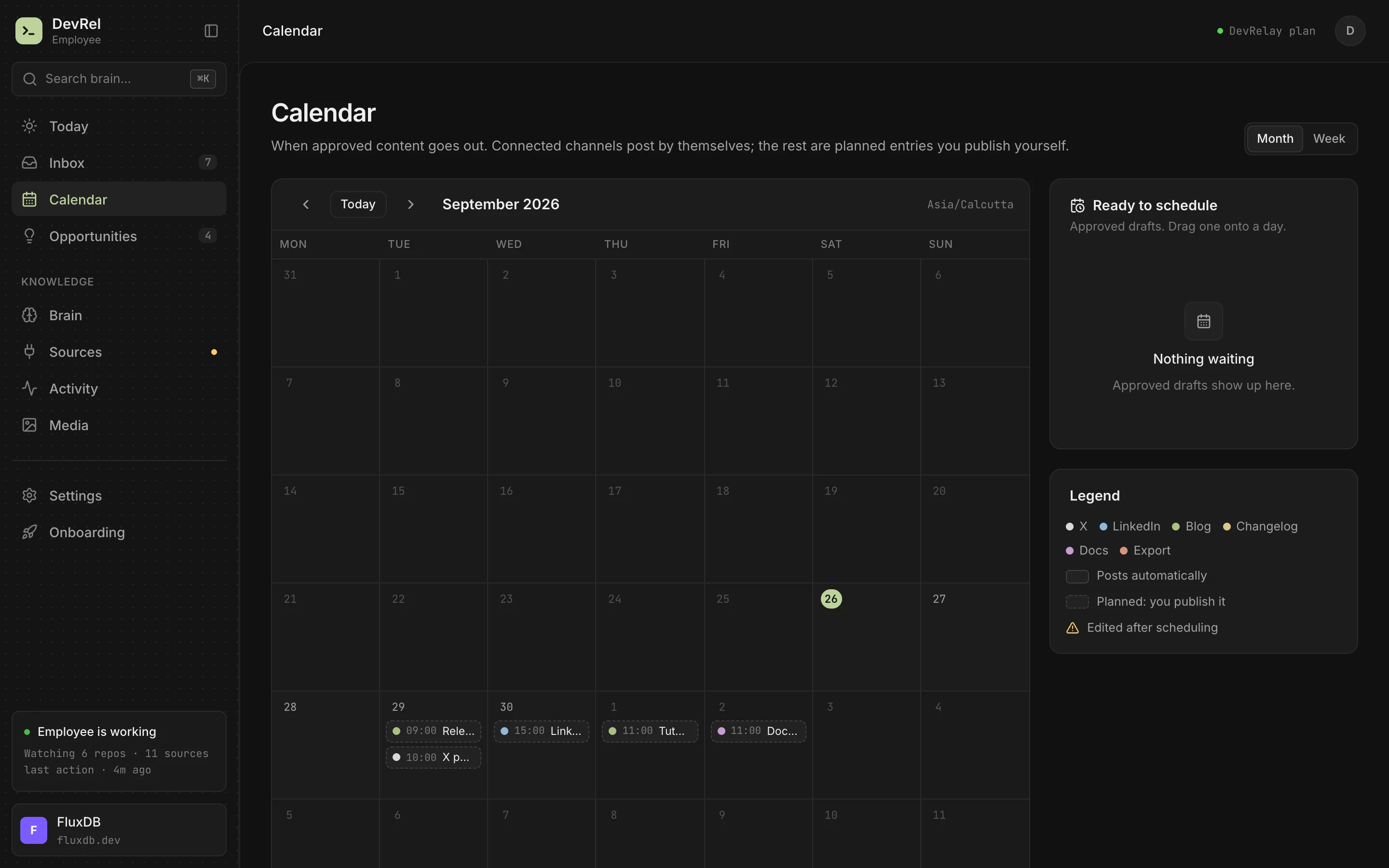
Every draft waits for your approval. You preview the newsletter as an email, as Markdown or as plain text, and "Copy for email" pastes the approved version into Substack, Mailchimp, Beehiiv or Gmail. DevRelay never sends email to your list. Approved drafts sit on a calendar, where connected channels post on schedule and the rest are entries you publish yourself.
See product update newsletters and recaps for what goes in each recap, or start with the free release notes generator to turn a list of changes into notes you can paste into template 2.
Frequently asked questions
What should a product update email include?
A subject line that names the most important change, preview text that adds why it matters, the headline change first with a sentence on what users can do now, one button or link for the main action, short lines for smaller changes, and a link to the changelog. Sign it from a person so replies reach someone.
How do you write a product update email?
Start from what users can notice, not what the team did. Pick the one change most readers care about and lead with it, write the subject line and preview text last so they name that change, add one line per smaller update, and cut version numbers, internal names and anything users can't see.
How often should you send product update emails?
Monthly suits most SaaS products. Send a separate feature email only for a change big enough to stand alone, and send price or breaking change emails whenever they happen, to the people affected, with several weeks' notice. Skip a month rather than send an email with nothing in it.
What is a good subject line for a product update email?
One that names the change, with the important words first: "Send later: schedule replies for your customer's morning" or "Send later, faster search and 3 fixes". About 40 characters keeps the point visible on a phone; the preview text carries the rest.
How do you announce a price change by email?
Say the new price and the date in the first two lines, say whether the customer's price changes now or at renewal, give an honest reason in a sentence, list who is and isn't affected, and offer every option, including downgrading or cancelling.
Should a product update email be plain text or HTML?
A simple email usually works best: a few headings, one image or GIF that shows the feature, and one button. It reads like a note from the team, survives every email client and still makes sense when images are blocked.