Best Changelog Tools in 2026: 17 Compared by Type
17 changelog tools compared: hosted pages and widgets, Git-based generators and AI tools that draft from GitHub, with prices, free plans and how to choose.
The short answer
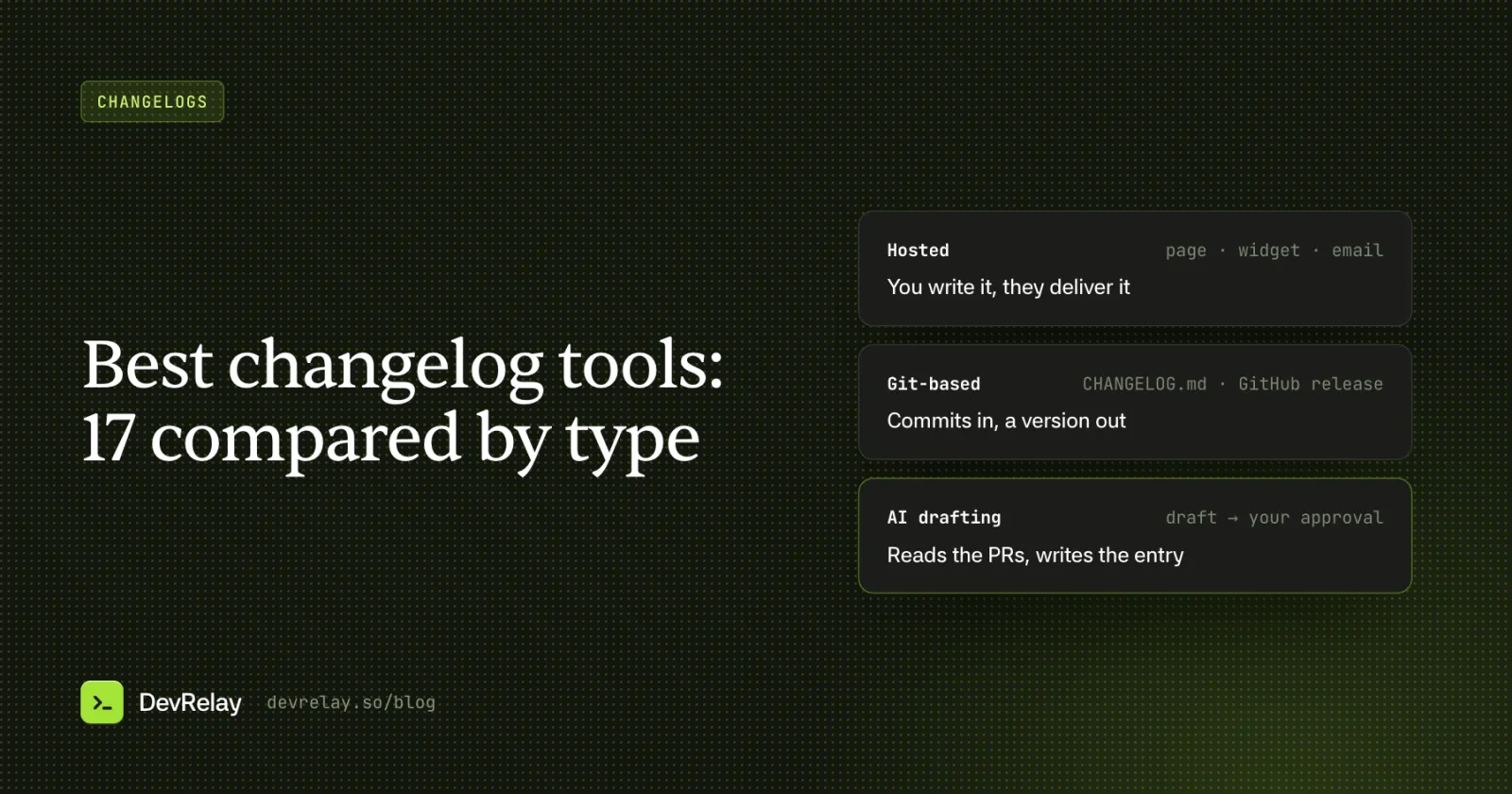
Changelog tools come in three kinds. Hosted tools like Beamer, Headway and AnnounceKit give you a page and an in-app widget, but you write every entry. Git-based generators like release-please, git-cliff and semantic-release build CHANGELOG.md from your commits for free. AI tools like ReleasePad, Changesmith and DevRelay draft the entry from your pull requests for a person to approve.
Key takeaways
- Decide who reads the changelog first: developers upgrading, or users of a SaaS product.
- Hosted tools deliver entries well but don't write them; Git tools write them only as well as your commits are written.
- AI tools draft from pull requests, so check what they read and whether a person approves before anything goes out.
- Prices were checked on each tool's own site on October 5, 2026; check again before you buy.
"Changelog tool" covers three different kinds of software, and most lists mix them. Some host the page and widget your users read. Some turn git history into a CHANGELOG.md and a GitHub release. A newer group uses AI to draft the entry from your pull requests. Pick the wrong kind and you'll still be writing every entry by hand, or you'll end up with a perfect CHANGELOG.md that no customer ever reads.
This guide sorts 17 tools into those three groups, using facts and prices taken from each tool's own website on October 5, 2026. For each one it says how entries get written, where they end up, and what it costs. Then it gives a decision table for picking one. Prices change, so check the pricing page before you buy.
The three kinds of changelog tool
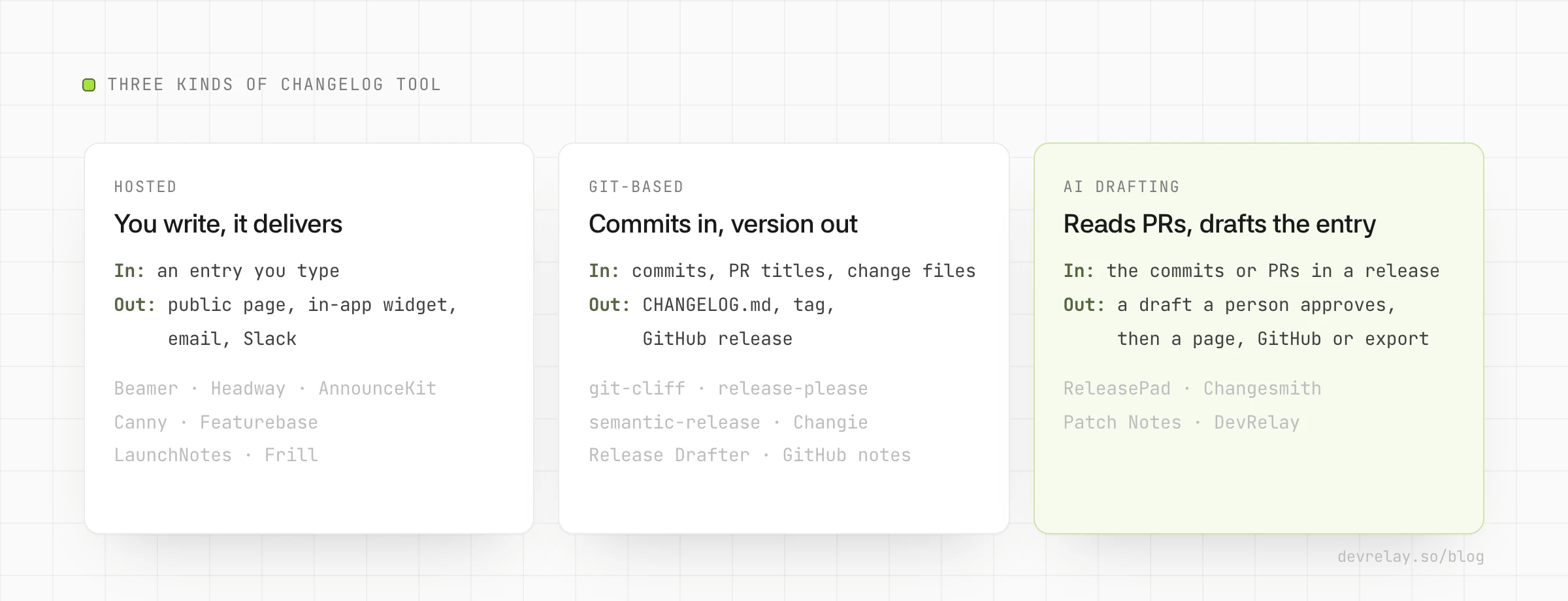
- Hosted changelog and announcement tools (Beamer, Headway, AnnounceKit, Canny, Featurebase, LaunchNotes, Frill). You write each entry in an editor. The tool publishes it to a public page, an in-app widget, email or Slack, and usually tracks who read it. These are for SaaS products whose users never look at GitHub.
- Git-based generators (git-cliff, release-please, semantic-release, Changie, Release Drafter, GitHub's generated release notes). They read commit messages, PR titles or change files and write
CHANGELOG.mdor a GitHub release, often bumping the version too. They're free and open source. The output is only as good as your commit messages, and it's written for developers. - AI tools that draft from GitHub (ReleasePad, Changesmith, Patch Notes, DevRelay). They read the commits or pull requests in a release and draft an entry for a person to edit and approve. They differ a lot in where the draft goes next.
Most teams end up with two of them: a git tool for versioning and a hosted page or AI drafter for the words users actually read.
The 17 tools at a glance
Prices are the lowest paid plan as shown on each tool's site on October 5, 2026, in US dollars.
| Tool | Kind | How entries get written | Where they go | Free plan | Lowest paid price |
|---|---|---|---|---|---|
| Beamer | Hosted | Editor | In-app widget, page, push | Yes, 1,000 MAU | $49/mo yearly, $59 monthly |
| Headway | Hosted | Markdown editor | Page, widget, Slack, X | Yes | $29/mo |
| AnnounceKit | Hosted | Editor with AI assist | Page, widgets, email add-on, Slack, feeds | No, 15-day trial | $49/mo yearly, $59 monthly |
| Canny | Hosted, with feedback | Editor | Page, widget, email | Yes, but no changelog | $79/mo billed yearly |
| Featurebase | Hosted, with feedback and support | Editor with AI drafting | Page, widget, email, Slack | Yes, 1 seat | $29 per seat/mo billed yearly |
| LaunchNotes | Hosted, enterprise | Editor with AI drafting | Page, widget, email, Slack | No, 14-day trial | $249/mo billed yearly |
| Frill | Hosted, with feedback | Editor | Widget, announcements | No, 14-day trial | $25/mo |
| git-cliff | Git | Commits, through a template | CHANGELOG.md | Open source | Free |
| release-please | Git | Conventional Commits | Release PR, CHANGELOG.md, GitHub release | Open source | Free |
| semantic-release | Git | Commit messages | GitHub release, tags, npm; file via plugin | Open source | Free |
| Changie | Git | Change files written while you work | CHANGELOG.md | Open source | Free |
| Release Drafter | Git | Merged PR titles and labels | Draft GitHub release | Open source | Free |
| GitHub release notes | Git | Merged PRs | GitHub release body | Built in | Free |
| ReleasePad | AI and hosted | AI draft from commits and PRs, approved | Page, widget, Markdown feed | Yes, limited posts | $35/mo per product |
| Changesmith | AI | AI draft from commits, PRs and issues | GitHub Releases | Yes, 3 a month | $9/mo |
| Patch Notes | AI | AI summary of a commit range | App Store, Google Play, web text | No, 5-release trial | $9/mo |
| DevRelay | AI, multi-channel | AI draft from each release's PRs and diffs, checked and approved | Markdown export, plus X, LinkedIn and docs PRs | Yes, drafts only | $999/mo |
Hosted changelog and announcement tools
Choose one of these when your readers are customers inside your product. They don't write anything for you, AI assist aside. What they do well is get each entry in front of the right users.
Beamer
Beamer is an in-app notification center with a changelog behind it. You write posts in its editor, and they show up in a widget inside your app, as popups, and as push notifications. The standalone changelog page starts on the paid Starter plan. The free plan covers 1,000 monthly active users and one teammate, with a watermark and no email. Starter is $49 a month billed yearly, or $59 monthly, for 5,000 MAU. Segmentation starts on Pro, and feedback and NPS are $99-a-month add-ons. Its site doesn't list a GitHub integration.
Pick it if in-app announcements to segments of logged-in users are the main job.
Headway
Headway is the simple one: a Markdown editor, a public changelog page and an in-product widget. Slack and X are its integrations. The free plan includes unlimited changelogs and page and widget customization. Pro is $29 a month and adds a custom domain, white labelling, team management, private changelogs and scheduled publishing. It has no email or segmentation.
Pick it if you want a clean changelog page and widget for little money, and you're happy to write every entry.
AnnounceKit
AnnounceKit sells a set of modules: changelog, feature requests and roadmap, knowledge base, NPS, in-app notifications and product tours. Each is priced on its own. The changelog module is $49 a month billed yearly, or $59 monthly, after a 15-day trial, and includes three team members. Its post editor has an AI assist that writes two versions of a post from your description of what shipped. Email and segmentation are $49-a-month add-ons. GitHub appears on its integrations list, but the page doesn't say what the integration does.
Pick it if you want widgets in many shapes, and may add a roadmap or tours later.
Canny
Canny is a feedback and roadmap tool first. Its changelog lets you announce what shipped and link each update to the feedback that asked for it, and subscribers get an email. The free plan doesn't include the changelog. Pro starts at $79 a month billed yearly and connects to GitHub, Jira and Linear. Canny's AI ("Autopilot") captures and sorts feedback; its site doesn't describe AI that writes changelog entries.
Pick it if you already collect feature requests and want to close the loop with the users who asked.
Featurebase
Featurebase started as feedback, roadmap and changelog, and its pricing page now leads with customer support (live chat, an inbox and an AI agent). Its announcements page says you can draft faster with AI and target updates by plan, role or location. Updates go to a public page, an in-app popup, email and Slack. There's a free plan for one seat; Growth is $29 per seat a month billed yearly, plus a charge per AI support resolution. Its pricing page doesn't say which plan includes the changelog, so check before you sign up.
Pick it if you want support, feedback and announcements in one tool.
LaunchNotes
LaunchNotes is product communication for larger companies: release notes, a roadmap, feedback, and an AI writer in the editor. Updates go to an announcement page, a widget, email, Slack and RSS, and Jira is its main integration. There's no free plan. Growth is $249 a month billed yearly for two users and one page, after a 14-day trial; advanced segmentation is on the custom-priced Premium plan.
Pick it if product marketing at a larger company owns release communication across several products.
Frill
Frill combines feedback ideas, a roadmap and announcements in an embeddable widget. Plans start at $25 a month (Startup), after a 14-day trial, and the roadmap starts on a higher plan. Its pricing page doesn't mention AI writing or a GitHub integration.
Pick it if you want a low-cost feedback widget that also carries announcements.
Git-based generators
These are free and live in your repository and CI. They're the right tool for a library's CHANGELOG.md, for version numbers and for GitHub releases. Their output is developer-facing: one line per commit or PR, in the words of whoever wrote the commit. Our guide to automating your changelog from GitHub has setup for the most common ones, and the Conventional Commits cheat sheet covers the input most of them expect.
git-cliff
git-cliff is a fast command-line tool that turns git history into a changelog through a template you control. It parses Conventional Commits or your own regular expressions, so it works with any commit style. Its GitHub integration (GitLab, Gitea, Bitbucket and Azure DevOps too) adds PR titles, labels and first-time contributors. It supports monorepos, installs from crates.io, npm, PyPI or Docker, and is dual-licensed MIT and Apache 2.0.
Pick it if you want full control over the format, in any language.
release-please
release-please, from Google's open source org, keeps a release pull request open with the next version and changelog. When you merge that PR, it updates CHANGELOG.md and version files, tags the release and creates the GitHub release. It reads Conventional Commits (fix → patch, feat → minor, ! → major), handles monorepos through a manifest file, and runs as a GitHub Action. GitHub only; Apache 2.0.
Pick it if you want automation but a person decides when to release.
semantic-release
semantic-release releases on every push to your release branch that contains releasable commits: it picks the version, writes release notes, tags, creates the GitHub release and publishes the package. A CHANGELOG.md file needs its changelog and git plugins. It supports GitHub and, through an official plugin, GitLab. MIT licensed. Its current docs live at semantic-release.org.
Pick it if you want every merge to main to ship with no human step.
Changie
Changie works from change files instead of commits. Each developer adds a small file describing their change while they work, through prompts in the terminal, and at release time Changie batches them into a version section of CHANGELOG.md. Kinds default to the Keep a Changelog sections, and it can bump version numbers in other files and handle monorepo projects. It's a single binary, works with any git host, and is MIT licensed.
Pick it if you want entries written by a person at the time of the change, not mined from commit messages. (Changesets does the same for JavaScript monorepos.)
Release Drafter
Release Drafter is a GitHub Action that keeps a draft GitHub release up to date as pull requests merge. It sorts PRs into sections by label, suggests the next version from those labels, and comes with an autolabeler. A person reviews the draft and publishes it. ISC licensed.
Pick it if you label pull requests and want release notes waiting when you're ready to release.
GitHub's generated release notes
The Generate release notes button on GitHub's release form lists the pull requests merged since the last release, new contributors and a link to the full diff. A .github/release.yml file groups PRs into sections by label and leaves out labels or authors you choose. It's free, built in, and editable before you publish. It doesn't write a CHANGELOG.md or pick versions, and it uses PR titles as they are.
Pick it if you want a decent default with no setup.
AI tools that draft from GitHub
These read what changed and write the entry for you, so the work that makes changelogs fall behind, turning PR titles into sentences users understand, mostly goes away. Look at what each one reads (commit messages only, or the code) and where the draft goes.
ReleasePad
ReleasePad is a hosted changelog with AI drafting. On its Pro plan it drafts entries from your commits and pull requests in your brand voice, and nothing publishes until you approve it. Entries go to a public changelog page on your domain, a small in-app widget, and a Markdown feed for AI assistants. The free plan has a limited number of posts and no time limit; Pro is a flat $35 a month per product with unlimited team members.
Pick it if you want one tool that drafts from GitHub and hosts the page users read.
Changesmith
Changesmith is a GitHub App and CLI that writes release notes from commits, pull requests and issues when you push a tag or create a release. You edit the draft in a Markdown editor, and it publishes to GitHub Releases, following the style of your existing CHANGELOG.md. The free plan gives 3 generations a month; Pro is $9 a month for unlimited.
Pick it if your release notes live on GitHub and you want them written rather than listed.
Patch Notes
Patch Notes is built for mobile apps. You connect GitHub, pick a commit range, and it summarizes the commits and PR titles into release text for the App Store, Google Play and the web, plus a public changelog page on its Pro plan. Basic is $9 a month (10 releases), Pro $19, and there's a $99 one-time lifetime plan; the trial covers 5 releases.
Pick it if you ship an app through the stores and need "What's new" text for each.
DevRelay
DevRelay is our product, so read this one with that in mind. It watches your GitHub, waits for a release, and reads the pull requests the release ships: diffs, linked issues and release notes, not just titles. Your Conventional Commits and labels decide each change's kind first. It drafts the changelog entry for the release, sorted into New, Improved, Fixed and Changed, in words your users know. When the release has something worth announcing, it also drafts the announcement, X and LinkedIn posts and a docs update. Every claim is checked against the evidence, and nothing goes out until you approve it.
What it doesn't do: it doesn't host a changelog page or an in-app widget. You export the approved entry as Markdown and paste or commit it wherever your changelog lives, which can be one of the hosted tools above. The free plan drafts and reviews; export, posting and scheduling are on the $999-a-month plan.
Pick it if the changelog is one of several things that fall behind every release, and you want the posts and docs drafted from the same evidence.
How to choose
Start from who reads your changelog and who writes it today.
| Your situation | Start with |
|---|---|
| Open source library, readers are developers | release-please or semantic-release, plus Conventional Commits |
| You label PRs and release by hand on GitHub | GitHub's generated notes or Release Drafter |
You want full control of the CHANGELOG.md format | git-cliff, or Changie if you prefer change files |
| SaaS product, you'll write entries yourself, small budget | Headway or Frill |
| SaaS product, announcements inside the app to segments of users | Beamer or AnnounceKit |
| You already run a feedback board | Canny or Featurebase |
| You want the entry drafted from GitHub and hosted in one place | ReleasePad |
| Release notes stay on GitHub, but you want them written well | Changesmith |
| Mobile app with store release notes | Patch Notes |
| Changelog, launch posts and docs all fall behind every release | DevRelay, exported to your changelog page |
Two rules of thumb. If nobody on the team will write an entry by hand every release, a hosted editor alone won't fix a changelog that's behind; you need a drafter. And if your users never visit GitHub, a git generator alone won't reach them; you need a page or widget.
What to check before you pick one
- What it reads. Commit messages only, PR titles, or the code and linked issues. Tools that only see commit messages write lines like
fix: nil check in resolver, because that's what they were given. - Released versus merged. Does it wait for a tag or release, or does it pick up whatever merged? Announcing work that hasn't shipped is the most common changelog mistake.
- Review before publishing. Can a person edit and approve each entry? Every AI tool above says yes; check that it's the default, not a setting.
- Where readers are. A page, a widget, email, Slack, the app stores or GitHub. Count where your users actually look.
- How the price grows. Per monthly active user (Beamer), per seat (Featurebase), per product (ReleasePad) or per module and add-on (AnnounceKit). Price it at next year's size, not today's.
- Getting out. Can you export your entries as Markdown or through an API if you switch?
For the entries themselves, whichever tool you use, our guide on how to write a changelog covers the format, and the release notes template has copy-paste formats. The free Keep a Changelog generator and release notes generator work without signing up.
How DevRelay does it
DevRelay starts from the release, not the editor. When a GitHub release ships, it collects the pull requests in it, decides which changes users would notice, and drafts one changelog entry for the release with a line for each. Low-priority changes go in the changelog and nowhere else, security-sensitive changes are held for a person, and a release with only maintenance work gets no announcement. Each draft lands in an approval inbox with its checks and the evidence behind every claim.
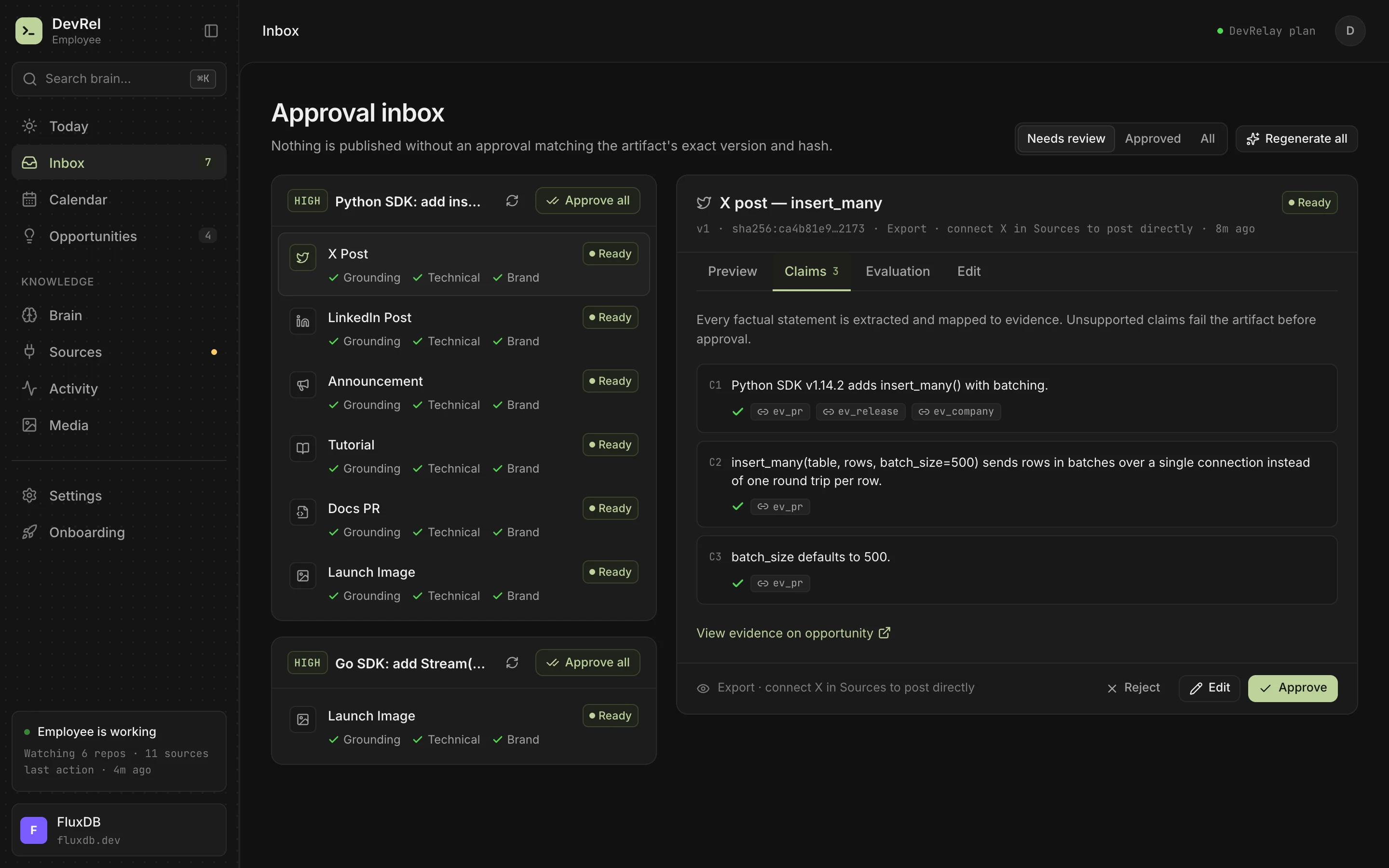
The changelog generator page shows the format, and the free plan lets you connect a repository and see the drafts for your next release.
Frequently asked questions
What is the best changelog tool?
It depends on who reads it. For an open source library, release-please or semantic-release with Conventional Commits is free and reliable. For a SaaS product with announcements inside the app, Beamer or AnnounceKit. If you want entries drafted from GitHub instead of written by hand, look at AI tools such as ReleasePad, Changesmith or DevRelay.
Is there a free changelog tool?
Yes. git-cliff, release-please, semantic-release, Changie and Release Drafter are open source, and GitHub can generate release notes for free. Among hosted tools, Beamer, Headway and Featurebase have free plans with limits.
What is a good Beamer alternative?
Headway is a cheaper, simpler hosted changelog with a widget. AnnounceKit is closest to Beamer for in-app announcements to segments of users. If you already collect feedback, Canny and Featurebase include a changelog next to the board.
Can AI write my changelog?
Yes, from the right input. AI changelog tools read commits, pull requests or diffs and draft entries in plain language. Read what each one is checked against and whether a person approves the draft before it's published, because a summary of a commit message can still be wrong.
What is the difference between a changelog tool and release notes software?
Mostly the name. Changelog tools usually keep a running list of every change, while release notes software is often sold for announcing one release to users. Many tools do both; our guide to release notes vs changelog explains the difference between the documents.