How to Automate Your Changelog From GitHub: Conventional Commits, SemVer and Release Tools
How changelog automation works, and how to set up GitHub's generated release notes, release-please, semantic-release, Changesets and git-cliff, with a comparison and what none of them do.
The short answer
Give each change a machine-readable type with Conventional Commits, PR labels or change files, then let a release tool group them, pick the next SemVer version and write the changelog. Use release-please if you want to decide when to release, semantic-release to release on every merge, Changesets for JavaScript monorepos and git-cliff for custom formats in any language.
Key takeaways
- Automation is only as good as its input: write commit descriptions for users.
- If you squash-merge, lint PR titles, not commits.
- release-please and Changesets add a human review step; semantic-release doesn't.
- Treat generated changelogs as a first draft and edit them.
Writing a changelog by hand at release time means reading every merged pull request since the last tag, working out which ones users would notice, and sorting them into sections. Do it for a few releases and you'll either automate it or stop doing it.
The good news is that most of the work can be automated, as long as you give the tools structured input. This guide walks through the pieces: Conventional Commits and Semantic Versioning as the input, GitHub's generated release notes, and the four most widely used release tools (release-please, semantic-release, Changesets and git-cliff), with setup for each and how to choose between them. At the end we cover the part none of them do.
How changelog automation works
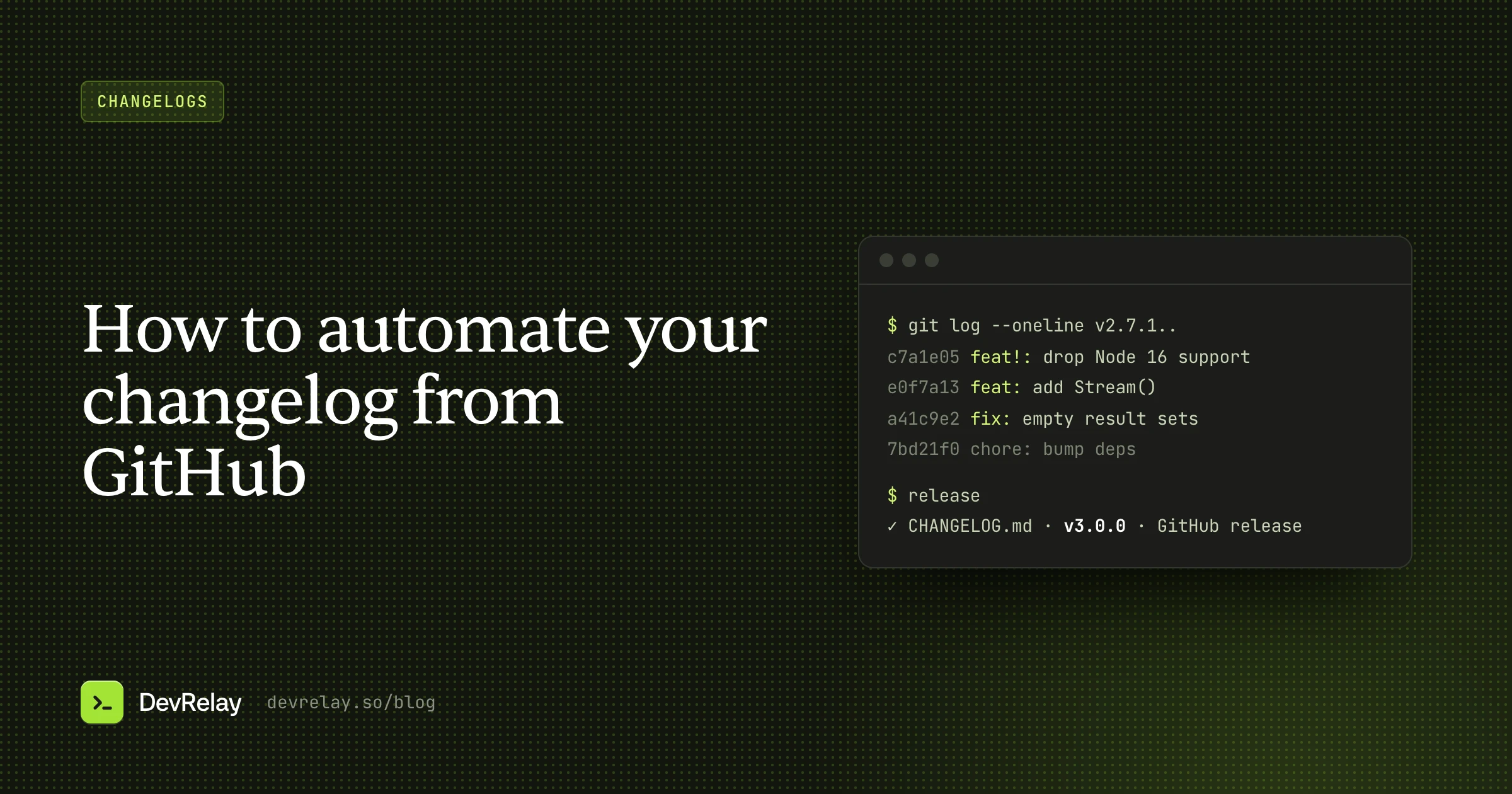
Every changelog tool follows the same pipeline:
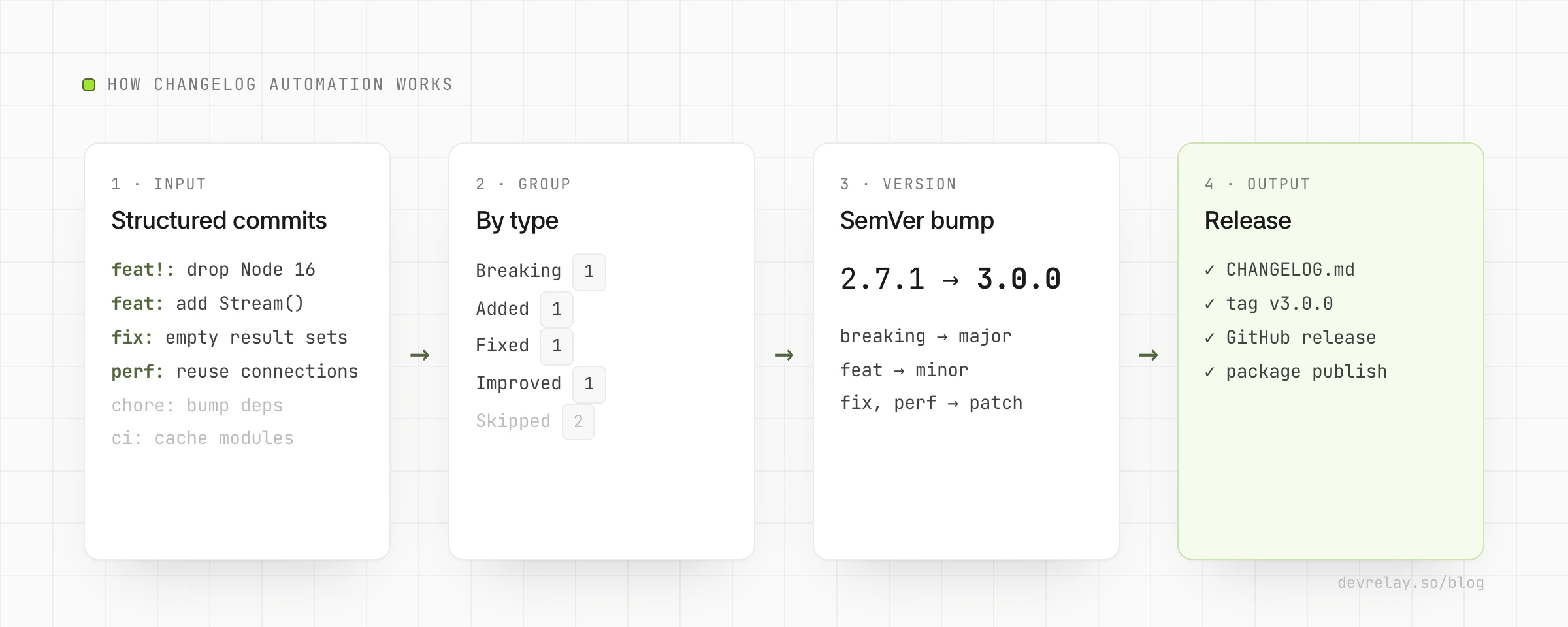
- Structured input. Each change carries its type (feature, fix, breaking) in a machine-readable way: a commit message prefix, a PR label, or a small change file.
- Grouping. The tool collects the changes since the last release and groups them by type.
- Versioning. From the types, it decides the next version: a breaking change means a major bump, a feature minor, a fix patch.
- Output. It writes the changelog section, bumps the version, tags the commit and creates a GitHub release.
The quality of the output depends almost entirely on step 1. A tool can't turn fix stuff into a useful changelog line.
The input: Conventional Commits
Conventional Commits is a convention for commit messages that most changelog tools understand:
<type>[optional scope][!]: <description>

[optional body]

[optional footer(s)]
The types that matter for a changelog:
| Commit | Meaning | Version bump |
|---|---|---|
feat: add Stream() for large result sets | New capability | Minor |
fix: handle empty result sets | Bug fix | Patch |
perf: reuse connections in the pool | Performance improvement | Patch |
feat!: drop Node 16 support | Breaking change (note the !) | Major |
BREAKING CHANGE: ... in the footer | Breaking change | Major |
docs:, chore:, ci:, test:, refactor: | Not user-facing | None |
Two tips that make a big difference:
- Write the description for users.
fix: queries on empty tables no longer failbecomes a good changelog line as-is.fix: nil check in resolverdoesn't. The description is your changelog entry, so write it like one. - If you squash-merge, lint the PR title. With squash merges, the PR title becomes the commit message, so that's the thing to validate.
Enforcing the convention with commitlint
commitlint checks messages against the convention. Locally it usually runs as a commit-msg git hook; in CI, you can check PR titles instead.
// commitlint.config.js
export default { extends: ["@commitlint/config-conventional"] };
# .github/workflows/pr-title.yml
name: PR title
on:
pull_request:
types: [opened, edited, synchronize]
jobs:
lint:
runs-on: ubuntu-latest
steps:
- uses: amannn/action-semantic-pull-request@v5
env:
GITHUB_TOKEN: ${{ secrets.GITHUB_TOKEN }}Option 1: GitHub's generated release notes
The zero-setup option. When you create a release on GitHub, you can click Generate release notes (or pass generate_release_notes: true through the API). GitHub lists the pull requests merged since the previous release, their authors, new contributors, and a link to the full diff.
By default everything goes in one list. A .github/release.yml file groups PRs by label and excludes noise:
# .github/release.yml
changelog:
  exclude:
    labels: [ignore-for-release, dependencies]
    authors: [dependabot]
  categories:
    - title: Breaking changes
      labels: [breaking-change]
    - title: New features
      labels: [enhancement, feature]
    - title: Bug fixes
      labels: [bug]
    - title: Other changes
      labels: ["*"]
Good for: projects that already label PRs consistently and just want release pages. Limits: it's based on labels, not commits; it doesn't write CHANGELOG.md or decide the version; and each line is a PR title, which is often written for reviewers rather than users.
Option 2: release-please
release-please, from Google, keeps a release pull request open. As Conventional Commits land on your main branch, it updates that PR with the next version number and the new CHANGELOG.md section. When you merge the release PR, it tags the release and creates the GitHub release.
# .github/workflows/release-please.yml
name: release-please
on:
  push:
    branches: [main]
permissions:
  contents: write
  pull-requests: write
jobs:
  release-please:
    runs-on: ubuntu-latest
    steps:
      - uses: googleapis/release-please-action@v4
        with:
          release-type: node
Good for: teams that want a human to decide when to release, and a chance to edit the changelog before it's final (you can edit the release PR). It supports many languages and monorepos. Limits: it relies on Conventional Commits being right; a mislabelled commit means a wrong version bump.
Option 3: semantic-release
semantic-release is fully automated: every push to the release branch that contains releasable commits produces a release. It works out the version from the commits, generates release notes, publishes the package (for example to npm) and creates the GitHub release. There's no release PR and no human step.
{
  "branches": ["main"],
  "plugins": [
    "@semantic-release/commit-analyzer",
    "@semantic-release/release-notes-generator",
    "@semantic-release/changelog",
    "@semantic-release/npm",
    "@semantic-release/github",
    "@semantic-release/git"
  ]
}
By default semantic-release doesn't write a CHANGELOG.md file; the @semantic-release/changelog plugin adds that, and @semantic-release/git commits it back to the repo.
Good for: libraries that release on every merge and want no manual step at all. Limits: no review before a release goes out, and every commit message is effectively public release text.
Option 4: Changesets
Changesets takes a different approach: instead of parsing commits, each pull request includes a small Markdown file describing the change and its bump type.
npx changeset---
"@acme/sdk": minor
---
`Stream()` returns rows as the server produces them, so large result sets
no longer have to fit in memory.At release time, changeset version consumes those files, bumps the package versions and writes the CHANGELOG.md entries. The Changesets GitHub Action opens a "Version Packages" pull request that does this for you, and publishes when it's merged.
Good for: JavaScript and TypeScript monorepos with several packages, and teams that want changelog text written deliberately rather than taken from commit messages. Limits: it's built around the npm ecosystem, and someone has to write the changeset in each PR (the bot can remind them).
Option 5: git-cliff
git-cliff is a single binary that generates a changelog from git history. It understands Conventional Commits out of the box, and everything else is configurable in a cliff.toml: how commits map to groups (with regular expressions), which to skip, and the output template.
# cliff.toml (excerpt)
[git]
conventional_commits = true
filter_unconventional = true
commit_parsers = [
  { message = "^feat", group = "Added" },
  { message = "^fix", group = "Fixed" },
  { message = "^perf", group = "Improved" },
  { message = "^(chore|ci|test|docs)", skip = true },
]
git cliff --tag v2.8.0 -o CHANGELOG.mdGood for: any language, and teams who want full control of the format. It's only the changelog step, so you pair it with your own tagging and release workflow. Limits: it doesn't bump versions or publish on its own.
Which should you use?
| Tool | Input | Writes CHANGELOG.md | Bumps version | Human step | Best for |
|---|---|---|---|---|---|
| GitHub generated notes | PR labels | No | No | Create the release | Release pages with no setup |
| release-please | Conventional Commits | Yes | Yes | Merge the release PR | Controlled release timing |
| semantic-release | Conventional Commits | With plugin | Yes | None | Release on every merge |
| Changesets | Change files | Yes | Yes | Merge the version PR | JS/TS monorepos |
| git-cliff | Commits (configurable) | Yes | No | Run it in your flow | Custom formats, any language |
If you're not sure, start with release-please if you want to decide when to release, or Changesets if you're in a JavaScript monorepo. Add commitlint either way.
What automation doesn't do
These tools are good at the mechanics: grouping, versioning, tagging. But look at what they actually produce: a list of commit messages or PR titles, sorted by type. They don't:
- Rewrite a line for users.
feat(pool): add maxIdle optstays exactly that. - Put breaking changes first unless you configure it, or explain what to do about them.
- Decide what's worth mentioning. A user-facing feature and an internal
feat:look the same. - Write the release notes, announcement or docs update that the changelog should feed into.
That's why automated changelogs often read like git log with headings. The fix is to treat the generated section as a first draft, and edit it the way we describe in how to write a changelog developers actually read. For what comes after the changelog, see release notes vs. changelog.
How DevRelay fits in
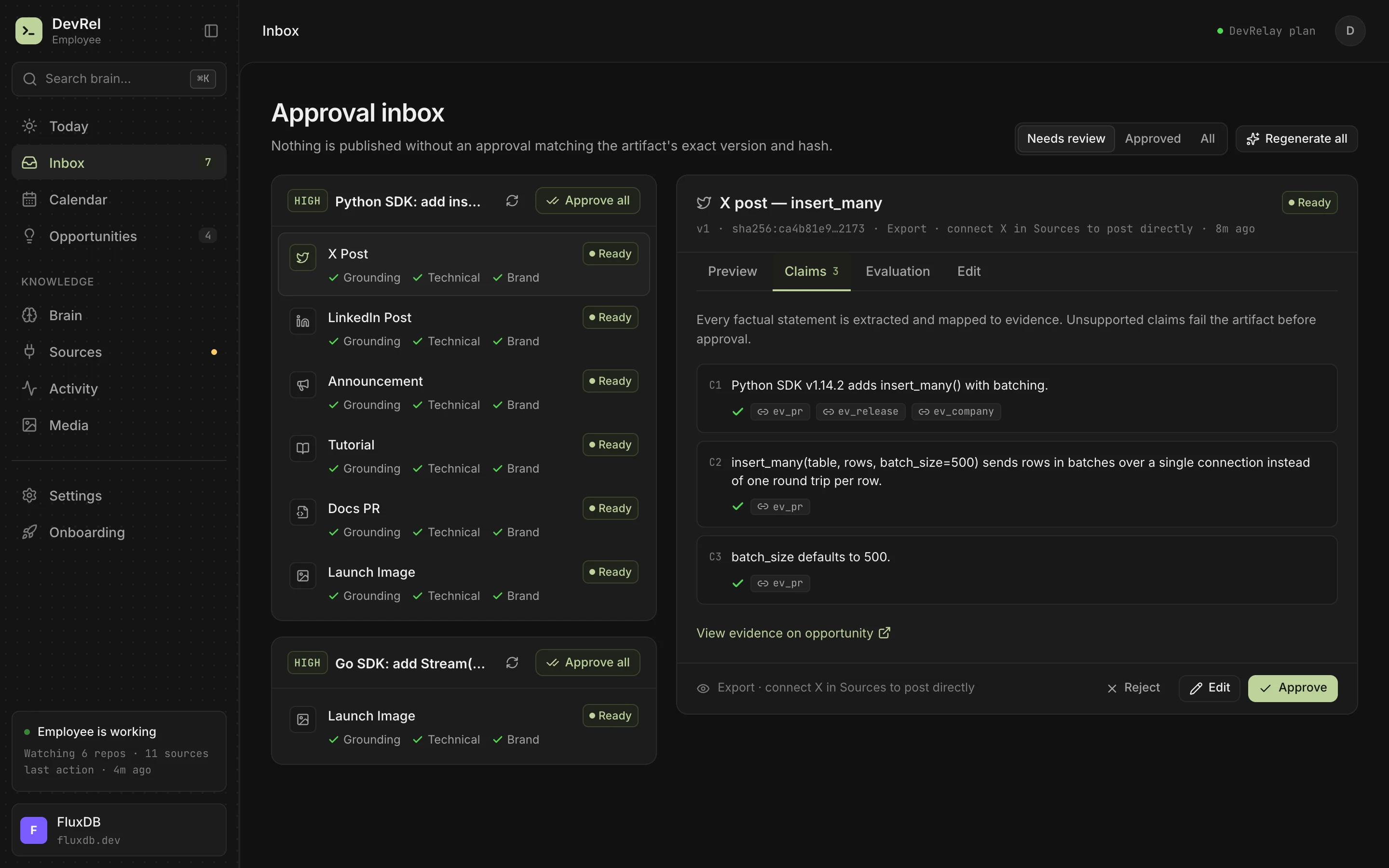
DevRelay works on the other side of your release tool. It doesn't bump versions or tag releases. It waits for the GitHub release your tooling creates, then reads the pull requests in it: diffs, linked issues and release notes, not just titles.
Your Conventional Commits and labels decide each change's kind first (feat!: and BREAKING CHANGE mean breaking, fix: means fixed, perf: means improved). When they don't say, a classifier reads the change. Then the changelog generator writes a line per change in the shape its kind needs, with Breaking and Deprecated first, and drafts the launch posts and docs updates from the same evidence. Every claim is checked against the diff, and nothing is published until you approve it.
Frequently asked questions
What are Conventional Commits?
A commit message convention, type(scope)!: description, where feat means a new feature, fix a bug fix, and ! or a BREAKING CHANGE footer a breaking change. Release tools read the types to group changes and choose the next version.
What is the difference between release-please and semantic-release?
release-please keeps a release pull request open and releases when you merge it, so a person decides when. semantic-release releases automatically on every push to the release branch that contains releasable commits.
Can GitHub generate a changelog automatically?
GitHub can generate release notes for each release from merged pull requests, grouped by label with a .github/release.yml file. It doesn't write a CHANGELOG.md or choose version numbers.